As with cable TV, over the air TV has a lot of junk programming but also has quite a bit of What You Want To Watch. Sometimes it is aired when you're not home or when you'd really rather watch something else. Hence the need for an Over The Air Digital Video Recorder.
There are multiple options from well known vendors such as Tivo and Channelmaster. These devices are highly integrated and include the tuner(s), disk storage and output to the TV (IE: decoders). A new class of devices have entered the market that might be better characterized as "gateways" since they do not decode the data sending video out an HDMI port but instead transcode the received video for recording and delivery across the network to phones, tablets, Roku boxes and other devices. One such device also supports remote viewing of live and recorded content.
We will look at that device -- the Tablo.

As purchased a Western Digital 2TB hard drive is providing video storage. It is worthwhile to note that Tablo reformats the drive and if you choose to re-purpose an existing drive you will lose all previously stored data. The drive shown is on the manufacturer's list of supported USB hard drives and it can be had for approximately $90. This is significantly more storage than provided by a Cable MSO in their DVR set tops.

The Tablo comes with the device itself, a power supply and an ethernet cable though it supports WiFi. It also includes a quick start guide more than adequate to ensure successful setup. One other thing that is "missing" is a remote control. This is because Tablo relies on applications loaded on tablets, phones or Roku devices to not only play back video but to provide an advanced, device-appropriate User Interface to browse for programs, schedule recordings, manage recorded programs and change Tablo device settings.

Notice that the back panel includes the RF/Coax F-connector, 2 USB ports, ethernet RJ-45 and power in but no HDMI ports. Since antenna video is delivered over your network this device does not need to be co-located with your TV and will support all the devices, TV or handheld, capable of playing back Tablo network video. This includes Android devices, Apple iPhone and iPad, Roku, web browsers and leverages the ability of Android devices to "cast" to Chromecast and airPlay when using iOS devices.
Setup is straightforward and should not be beyond the capabilities of someone who can tackle a Chromecast device. Like your TV, but unlike many other devices, the Tablo does a channel scan to find channels expected in your region. Location can be set automagically but entering a five digit ZIP code is significantly faster. Installing an app on a phone/tablet or using a computer web browser is recommended and for firmware updates is mandatory as the Roku app does not support firmware upgrade. Apps for these devices can be found in the usual place and are free of charge. Downloading the guide data and the cover art images will take a noticeable amount of time as will "sync-ing" your playback device application. Often simply connecting to the device is not as snappy as you might like but once initial startup is over the system is responsive.
We are operating at the keyboard bandwidth barrier yet time does not permit an exhaustive screen by screen review of Tablo's awesomeness. But a few can be slipped in. First is the "Grid Guide" as archaic as it is inevitable.

The three small bar icon at the top left provides navigation to other Tablo screens/features. The magnifying glass implies a search capability that is indeed there. The grid guide shows current programming and progress within current broadcasts and offers twenty four hours of programming accessible by scrolling to the right. Viewing a channel is as simple as clicking on the channel identifier to the far left. While you are watching a program Tablo will temporarily record that channel in order to support pause, rewind and fast forward. It will continue to record into that buffer (tuner availability permitting) when you change channels allowing you to switch between 2 (or 4, depending on model) channels quickly and without missing any of the programs.
When you select the icon at the top left you are presented with the navigation panel.

From here you can move from the grid guide (Live TV) to a panel showing only Prime Time content in a cover art display, get to genre selections (TV Shows, Movies, Sports), see currently scheduled recording events and previously recorded content. You can (on the shown device's screen) manage the device settings and disconnect your device from Tablo. A sample Prime Time is shown below
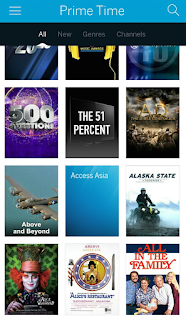
Selecting one of these program's "cover art" initiates a record workflow and since recording programs for later viewing kicked all this off let's at least dive into that.

You are presented with more program or series information and the option (for series) to record new episodes or all (includes any re-runs). Since a lot of what gets aired on secondary OTA channels is syndicated programming, Rec All is a pretty good option. But wait. There's more. If you'll scroll down you will see...
 First thing to note is that Tablo is smart enough not to re-record the same episode more than once. You are also being offered the option to change the time a particular episode is recorded (to manage recording conflicts) or to delete scheduled recordings of episodes you do not want.
Recording is all well and good, but it isn't really worth much unless you can watch the recording.

It is difficult (impossible?) to assess video quality from a screen capture (and we're not uploading any videos) but on all devices tried to date video quality rivals what you get from most cable providers for most channels (on the cable network). What you should notice is not just the progress ball/bar and the playback control (this was taken during a live playback) but the fast forward 30 secs, rewind 20 secs options that are commonly used to skip commercials. Also note the icon on the lower right, used to "cast" the playback to a Chromecast device. Apple iPhones and iPads have a similar icon to use AirPlay with an AppleTV device.
Then there is remote access/playback. This feature relies on port forwarding and while Tablo will attempt to set this up when the router is configured for and capable of UPnP manual settings are often required. With the latest firmware, Tablo will indicate status of port forwarding and provide the details necessary to manually configure your router. Tablo has changed the external port assignments forcing a reconfiguration that is a PITA. Currently Tablo requires that remote devices be paired before use requiring at least one Tablo connection/sync on the local LAN. Remote access also requires a subscription to Tablo Guide Data Subscription (30 day free trial). More on this later.
Remote access has been evaluated by TOD Friends and Family on a variety of devices: iPad, iPad with AppleTV, various Android devices, and Android with Chromecast. Phones were tested on remote LANs and over 4G LTE. In all cases the only device with any objectionable operation was Chromecast and this is attributed to the relatively high data rates supported by Tablo for on-LAN video combined with Chromecast's 1x1 802.11n technology. Even then the video quality, even with sports (remote viewing of the Preakness), was deemed to be indistinguishable from live. To the trained eye it really wasn't but for most folks, especially those accustomed to cable and YouTube video quality, it was far beyond "watchable" and well in to the range of "very good."
Subscription Guide Data is optional but supports an enriched User Interface and more advanced record scheduling as well as remote access. Without these data any recordings must be done old school - manually by date and time. Guide Data can be purchased by the month ($4.99), year ($49.99) or as a lifetime subscription ($149.99) in which case you are betting that you and Tablo will both be around in three years. Good bet for the latter. Not sure about the former.
The device itself comes in three flavours: a dual tuner, a quad tuner and a "Metro" edition incorporating fractal antennas eliminating the need for an external OTA antenna. The Metro is for urbanites living fairly close to broadcast antenna farms (less than 30 miles) who do not want to or are not allowed to install any kind of external antenna. The MaxLinear tuners are some of the best available, better than those in most TVs. ViXS provides the brains of the box and incorporates some of the best transcoding technology on the market today.
Tablo is not without faults, but most of these are the results of product immaturity and with each firmware upgrade problems are being eliminated and features enhanced. That said, firmware upgrade has been one of the issues with the latest update requiring a manual power-down reboot for the upgrade to take hold. Tablo has benefitted from user familiarity by leveraging existing customer devices of choice (IE: Android vs iPad) avoiding foisting yet another UI design language on their customers. This model has not been adopted by pay-TV service providers despite the dramatic improvements over a cheesy UI powered by the cheapest remote that China, Inc. can scrape out of the parts bin. It may be a bit quirky now but as Tablo irons out the kinks it promises to push the OTA TV experience beyond any cable offer available today.
There are multiple options from well known vendors such as Tivo and Channelmaster. These devices are highly integrated and include the tuner(s), disk storage and output to the TV (IE: decoders). A new class of devices have entered the market that might be better characterized as "gateways" since they do not decode the data sending video out an HDMI port but instead transcode the received video for recording and delivery across the network to phones, tablets, Roku boxes and other devices. One such device also supports remote viewing of live and recorded content.
We will look at that device -- the Tablo.

As purchased a Western Digital 2TB hard drive is providing video storage. It is worthwhile to note that Tablo reformats the drive and if you choose to re-purpose an existing drive you will lose all previously stored data. The drive shown is on the manufacturer's list of supported USB hard drives and it can be had for approximately $90. This is significantly more storage than provided by a Cable MSO in their DVR set tops.

The Tablo comes with the device itself, a power supply and an ethernet cable though it supports WiFi. It also includes a quick start guide more than adequate to ensure successful setup. One other thing that is "missing" is a remote control. This is because Tablo relies on applications loaded on tablets, phones or Roku devices to not only play back video but to provide an advanced, device-appropriate User Interface to browse for programs, schedule recordings, manage recorded programs and change Tablo device settings.

Notice that the back panel includes the RF/Coax F-connector, 2 USB ports, ethernet RJ-45 and power in but no HDMI ports. Since antenna video is delivered over your network this device does not need to be co-located with your TV and will support all the devices, TV or handheld, capable of playing back Tablo network video. This includes Android devices, Apple iPhone and iPad, Roku, web browsers and leverages the ability of Android devices to "cast" to Chromecast and airPlay when using iOS devices.
Setup is straightforward and should not be beyond the capabilities of someone who can tackle a Chromecast device. Like your TV, but unlike many other devices, the Tablo does a channel scan to find channels expected in your region. Location can be set automagically but entering a five digit ZIP code is significantly faster. Installing an app on a phone/tablet or using a computer web browser is recommended and for firmware updates is mandatory as the Roku app does not support firmware upgrade. Apps for these devices can be found in the usual place and are free of charge. Downloading the guide data and the cover art images will take a noticeable amount of time as will "sync-ing" your playback device application. Often simply connecting to the device is not as snappy as you might like but once initial startup is over the system is responsive.
We are operating at the keyboard bandwidth barrier yet time does not permit an exhaustive screen by screen review of Tablo's awesomeness. But a few can be slipped in. First is the "Grid Guide" as archaic as it is inevitable.

The three small bar icon at the top left provides navigation to other Tablo screens/features. The magnifying glass implies a search capability that is indeed there. The grid guide shows current programming and progress within current broadcasts and offers twenty four hours of programming accessible by scrolling to the right. Viewing a channel is as simple as clicking on the channel identifier to the far left. While you are watching a program Tablo will temporarily record that channel in order to support pause, rewind and fast forward. It will continue to record into that buffer (tuner availability permitting) when you change channels allowing you to switch between 2 (or 4, depending on model) channels quickly and without missing any of the programs.
When you select the icon at the top left you are presented with the navigation panel.

From here you can move from the grid guide (Live TV) to a panel showing only Prime Time content in a cover art display, get to genre selections (TV Shows, Movies, Sports), see currently scheduled recording events and previously recorded content. You can (on the shown device's screen) manage the device settings and disconnect your device from Tablo. A sample Prime Time is shown below

Selecting one of these program's "cover art" initiates a record workflow and since recording programs for later viewing kicked all this off let's at least dive into that.

You are presented with more program or series information and the option (for series) to record new episodes or all (includes any re-runs). Since a lot of what gets aired on secondary OTA channels is syndicated programming, Rec All is a pretty good option. But wait. There's more. If you'll scroll down you will see...

Recording is all well and good, but it isn't really worth much unless you can watch the recording.

It is difficult (impossible?) to assess video quality from a screen capture (and we're not uploading any videos) but on all devices tried to date video quality rivals what you get from most cable providers for most channels (on the cable network). What you should notice is not just the progress ball/bar and the playback control (this was taken during a live playback) but the fast forward 30 secs, rewind 20 secs options that are commonly used to skip commercials. Also note the icon on the lower right, used to "cast" the playback to a Chromecast device. Apple iPhones and iPads have a similar icon to use AirPlay with an AppleTV device.
Then there is remote access/playback. This feature relies on port forwarding and while Tablo will attempt to set this up when the router is configured for and capable of UPnP manual settings are often required. With the latest firmware, Tablo will indicate status of port forwarding and provide the details necessary to manually configure your router. Tablo has changed the external port assignments forcing a reconfiguration that is a PITA. Currently Tablo requires that remote devices be paired before use requiring at least one Tablo connection/sync on the local LAN. Remote access also requires a subscription to Tablo Guide Data Subscription (30 day free trial). More on this later.
Remote access has been evaluated by TOD Friends and Family on a variety of devices: iPad, iPad with AppleTV, various Android devices, and Android with Chromecast. Phones were tested on remote LANs and over 4G LTE. In all cases the only device with any objectionable operation was Chromecast and this is attributed to the relatively high data rates supported by Tablo for on-LAN video combined with Chromecast's 1x1 802.11n technology. Even then the video quality, even with sports (remote viewing of the Preakness), was deemed to be indistinguishable from live. To the trained eye it really wasn't but for most folks, especially those accustomed to cable and YouTube video quality, it was far beyond "watchable" and well in to the range of "very good."
Subscription Guide Data is optional but supports an enriched User Interface and more advanced record scheduling as well as remote access. Without these data any recordings must be done old school - manually by date and time. Guide Data can be purchased by the month ($4.99), year ($49.99) or as a lifetime subscription ($149.99) in which case you are betting that you and Tablo will both be around in three years. Good bet for the latter. Not sure about the former.
The device itself comes in three flavours: a dual tuner, a quad tuner and a "Metro" edition incorporating fractal antennas eliminating the need for an external OTA antenna. The Metro is for urbanites living fairly close to broadcast antenna farms (less than 30 miles) who do not want to or are not allowed to install any kind of external antenna. The MaxLinear tuners are some of the best available, better than those in most TVs. ViXS provides the brains of the box and incorporates some of the best transcoding technology on the market today.
Tablo is not without faults, but most of these are the results of product immaturity and with each firmware upgrade problems are being eliminated and features enhanced. That said, firmware upgrade has been one of the issues with the latest update requiring a manual power-down reboot for the upgrade to take hold. Tablo has benefitted from user familiarity by leveraging existing customer devices of choice (IE: Android vs iPad) avoiding foisting yet another UI design language on their customers. This model has not been adopted by pay-TV service providers despite the dramatic improvements over a cheesy UI powered by the cheapest remote that China, Inc. can scrape out of the parts bin. It may be a bit quirky now but as Tablo irons out the kinks it promises to push the OTA TV experience beyond any cable offer available today.


 Posts
Posts


